I’m sharing a ready-to-use PUBG Mobile keyboard and mouse Profile for LaiCai Screen Mirroring. It includes two mapping layers and covers the basic controls you need for on-foot gameplay and driving.
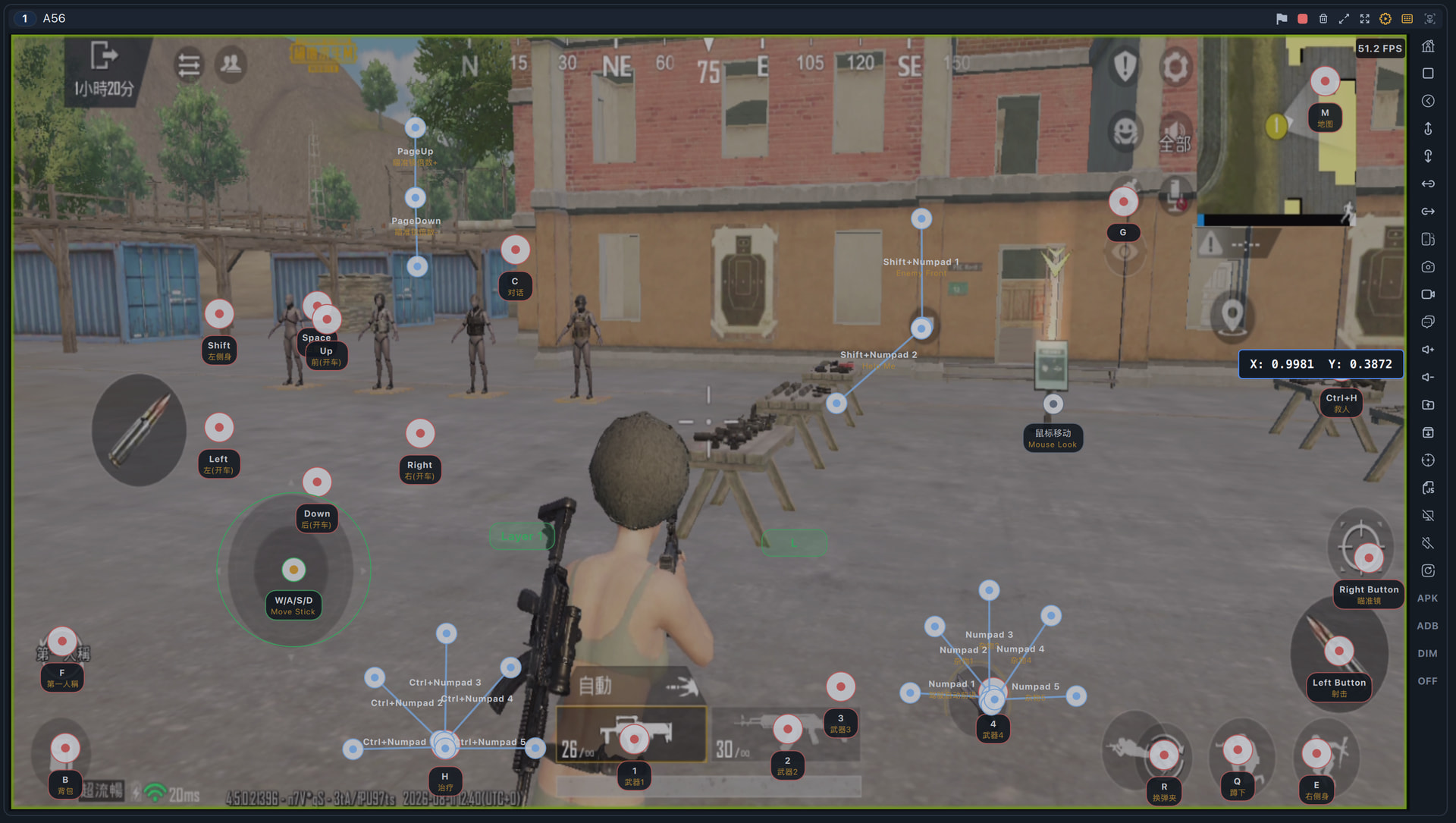
Key mappings included
- Movement and camera: W/A/S/D, mouse look, running, crouching, leaning, and view/first-person switching
- Combat: Left Mouse Button to fire, Right Mouse Button to aim, R to reload, and 1–4 to switch weapons
- Inventory and support: B for backpack, M for map, H for healing, Ctrl+H for reviving, and C for chat
- Scope controls: Page Up / Page Down to increase or decrease scope magnification
- Vehicle controls: Arrow keys and W/A/S/D for movement, Q for acceleration, Z for braking, plus an auto-drive shortcut
- Quick actions: Numpad shortcuts for items and team callouts, including “Enemy Front” and “Help Me”
- Mouse shortcuts: Middle Mouse Button and mouse-wheel up/down actions in the relevant mapping layer
Download and install
Chinese Profile file: pubg_keyboard_mouse.json (106.0 KB)
English Profile file: pubg_keyboard_mouse_english.json (112.7 KB)
- Download the Profile file above.
- Save it to:
Documents/LaiCai/KeyMap/profiles - Open LaiCai Screen Mirroring and load the Profile from Key Mapping.
Because PUBG Mobile control layouts can vary, please adjust each mapping point to match the button positions in your own game layout. I recommend testing the controls in Training Mode after importing the Profile.
For more instructions, see the full guide:
How to Configure Key Mapping
If you have any questions, leave a reply below.